

How to make the Dialog field mandatory in Axapta reports
Dialog field Mandatory
In the below , i have marked in yellow shows you , how to make the dialog field mandatory.
public Object dialog(Object _dialog)
{
int i;
DialogRunbase dialog = _dialog;
DialogField checkField;
FormDateControl control;
;
dialog.addGroup("@SYS119346");
fieldConversionDate = dialog.addFieldValue(typeid(InventStdCostConvEndDate), conversionDate);
control = fieldConversionDate.fieldControl();
control.mandatory(true);
control.allowEdit(false);
return dialog;
}
AX2012 X++ Code to read csv file
// Create a new job and paste the below code
static void RB_ReadCsvFile(Args _args)
{
#File
IO iO;
CustAccount custAccount;
CustName custname;
FilenameOpen filename = "C:\\Desktop\\RB.csv";
Container record;
boolean first = true;
;
iO = new CommaTextIo(filename,#IO_Read);
iO.inFieldDelimiter(';');
if (! iO || iO.status() != IO_Status::Ok)
{
throw error("@SYS19358");
}
while (iO.status() == IO_Status::Ok)
{
record = iO.read();
if (record)
{
if (first) // to exclude the header
{
first = false;
}
else
{
custAccount = conpeek(record, 1);
custname = conpeek(record, 2);
info(strfmt('%1--%2',custAccount,custname));
}
}
}
}
AX2012 X++ Code validate the email id
// Create a job and paste the below code ..
static void RB_validateEmail(Args _args)
{
Str email;
Str MatchEmailPattern =@"\b[a-zA-Z0-9._%+-]+@[a-zA-Z0-9.-]+\.[a-zA-Z]{2,4}\b";
System.Text.RegularExpressions.Match myMatch;
;
email = "rameshAX2012@gmail.com";
myMatch = System.Text.RegularExpressions.Regex::Match(email, MatchEmailPattern);
if (myMatch.get_Success())
info(strFmt("%1 is an valid email id ", email));
else
info(strFmt("%1 is not an valid email id ", email));
}
AX2012 X++ code to combine the folder path
// Create a job and paste the below code
static void RB_PathCombine(Args _args)
{
str path1 = @"C:\TestDir";
str path2 = @"C:\TestDir\";
str path3 = "MyFolder";
str combination;
combination = System.IO.Path::Combine(path1, path3);
info (strFmt("Combinig '%1' with '%2' gives '%3'", path1, path3, combination));
combination = System.IO.Path::Combine(path2, path3);
info (strFmt("Combinig '%1' with '%2' gives '%3'", path2, path3, combination));
}
AX2012 X++ code to read the text file
//Create a new job and paste the code
static void RB_ReadTextFile(Args _args)
{
Filename filename = @'C:\Desktop\AX2012.txt';
System.IO.StreamReader reader;
System.String line;
InteropPermission interopPermission;
Str text;
interopPermission = new InteropPermission(InteropKind::ClrInterop);
interopPermission.assert();
reader = new System.IO.StreamReader(filename,System.Text.Encoding::get_UTF8());
line = reader.ReadLine();
while (!System.String::IsNullOrEmpty(line))
{
line = reader.ReadLine();
text = line;
info(strfmt("%1", text));
}
reader.Close();
reader.Dispose();
}
static void RB_ReadTextFile(Args _args)
{
Filename filename = @'C:\Desktop\AX2012.txt';
System.IO.StreamReader reader;
System.String line;
InteropPermission interopPermission;
Str text;
interopPermission = new InteropPermission(InteropKind::ClrInterop);
interopPermission.assert();
reader = new System.IO.StreamReader(filename,System.Text.Encoding::get_UTF8());
line = reader.ReadLine();
while (!System.String::IsNullOrEmpty(line))
{
line = reader.ReadLine();
text = line;
info(strfmt("%1", text));
}
reader.Close();
reader.Dispose();
}
AX2012 X++ Code to generate dates for one year
// Create a new job and paste the below code
static void RB_OneYearDate(Args _args)
{
int month,day,x,years,i,j,k;
TransDate preDate,nextmonth,monthStart,startdate,enddate,nextdate;
;
years = year(systemdateget());
for (i=1;i<=12;i++)
{
month = 0;
nextmonth = mkDate(1,month+i,(years));
enddate = endmth(nextmonth);
day = dayofmth(enddate);
for(j=1; j<=day; j++)
{
month = mthofyr(nextmonth);
nextdate = mkDate(j,month,(years));
info(strfmt("%1",nextdate));
}
}
}
{
month = 0;
nextmonth = mkDate(1,month+i,(years));
enddate = endmth(nextmonth);
day = dayofmth(enddate);
for(j=1; j<=day; j++)
{
month = mthofyr(nextmonth);
nextdate = mkDate(j,month,(years));
info(strfmt("%1",nextdate));
}
}
}
AX2012 Read And Import Excel File using X++ Code
X++ code to read the Excel file
static void RB_ReadExcel(Args _args)
{
SysExcelApplication application;
SysExcelWorkbooks workbooks;
SysExcelWorkbook workbook;
SysExcelWorksheets worksheets;
SysExcelWorksheet worksheet;
SysExcelCells cells;
COMVariantType type;
FilenameOpen filename;
int row = 1; // if the excel has the header
TransDate empJoiningDate;
real salary;
str empId;
int totNoOfLeaves;
;
application = SysExcelApplication::construct();
workbooks = application.workbooks();
filename = "C:\\Users\\balakrishnanr\\Desktop\\emp.xlsx"; // file path
try
{
workbooks.open(filename);
}
catch (Exception::Error)
{
throw error("File not found");
}
workbook = workbooks.item(1);
worksheets = workbook.worksheets();
worksheet = worksheets.itemFromNum(1);
cells = worksheet.cells();
//Iterate through cells and get the values
do
{
//Incrementing the row line to next Row
row++;
empId = cells.item(row,1).value().bStr();
empJoiningDate = cells.item(row,2).value().date();
salary = cells.item(row,3).value().double();
totNoOfLeaves = cells.item(row,4).value().int();
info(strFmt("Empl Id:- %1 , DOJ :- %2 , Salary :- %3 , TotNoLeaves :- %4",empId,empJoiningDate,salary,totNoOfLeaves));
// Loads the next row into the variant type and validating that its is empty or not
type = cells.item(row+1, 1).value().variantType();
}
while (type != COMVariantType::VT_EMPTY);
// quits the application
application.quit();
}
Preventing users from opening new workspaces
You can prevent users from opening new workspaces by adding the code that immediately closes these aging. Add the the following code to \Classes\Info\workspaceWindowCreated:
void workspaceWindowCreated(int _hWnd)
{
;
    // Put workspace window specific initialization here.
    // Begin -->
    if(xInfo::currentWorkspaceNum()>1)
    {
        Infolog.shutDown(true);
    }
    // End <--
}
Convert Numerals to Text in Indian Format (AX2012)
// Converting Numeral to Text of Indian Format .
// Add a new method in the Class Name : Global and paste the below code .
static TempStr numeralsToTxt_IN(real _num)
{
int numOfPennies = (decround(frac(_num), 2) * 100) mod 100;
real test = _num - frac(_num);
int numOfTenths;
str 20 ones[19], tenths[9], hundreds, thousands, lakhs, crores;
int64 temp;
str 200 returntxt;
str 200 pennytxt;
int penny;
real modOperator(real a1, real a2)
{
int tmpi;
real tmp1, tmp2;
tmp1 = a1 / a2;
tmpi = real2int(tmp1);
tmp2 = tmpi;
return (tmp1 - tmp2)*a2;
}
real checkPower(real _test, int64 _power)
{
int64 numOfPower;
if (_test >= _power)
{
numOfPower = _test div _power;
if (numOfPower >= 100)
{
temp = numOfPower div 100;
returntxt = returntxt + ' ' + ones[temp] + ' ' + hundreds;
numOfPower = numOfPower mod 100;
}
if (numOfPower >= 20)
{
temp = numOfPower div 10;
returntxt = returntxt + ' ' + tenths[temp];
numOfPower = numOfPower mod 10;
}
if (numOfPower >= 1)
{
returntxt = returntxt + ' ' + ones[numOfPower];
numOfPower = numOfPower mod 10;
}
switch(_power)
{
case 10000000 :
{
returntxt = returntxt + ' ' + Crores;
_test = modOperator(_test, 10000000);
break;
}
case 100000 :
{
returntxt = returntxt + ' ' + lakhs;
_test = modOperator(_test, 100000);
break;
}
case 1000 :
{
returntxt = returntxt + ' ' + thousands;
_test = modOperator(_test, 1000);
break;
}
case 100 :
{
returntxt = returntxt + ' ' + hundreds;
_test = modOperator(_test, 100);
break;
}
}
}
return _test;
}
#Define.text_1('One')
#Define.text_2('Two')
#Define.text_3('Three')
#Define.text_4('Four')
#Define.text_5('Five')
#Define.text_6('Six')
#Define.text_7('Seven')
#Define.text_8('Eight')
#Define.text_9('Nine')
#Define.text_10('Ten')
#Define.text_11('Eleven')
#Define.text_12('Twelve')
#Define.text_13('Thirteen')
#Define.text_14('Fourteen')
#Define.text_15('Fifteen')
#Define.text_16('Sixteen')
#Define.text_17(' Seventeen' )
#Define.text_18(' Eighteen' )
#Define.text_19(' Nineteen' )
#Define.text_20(' Twenty' )
#Define.text_30(' Thirty' )
#Define.text_40(' Forty' )
#Define.text_50(' Fifty' )
#Define.text_60(' Sixty' )
#Define.text_70(' Seventy' )
#Define.text_80(' Eighty' )
#Define.text_90(' Ninety' )
#Define.text_100(' Hundred' )
#Define.text_1000(' Thousand' )
#Define.text_100000(' Lakh' )
#Define.text_10000000(' Crore' )
#Define.text_and(' Rupees and' )
#Define.text_paise(' Paise Only' )
#Define.text_ruppe(' Rupees Only' )
ones[1] = #text_1;
ones[2] = #text_2;
ones[3] = #text_3;
ones[4] = #text_4;
ones[5] = #text_5;
ones[6] = #text_6;
ones[7] = #text_7;
ones[8] = #text_8;
ones[9] = #text_9;
ones[10] = #text_10;
ones[11] = #text_11;
ones[12] = #text_12;
ones[13] = #text_13;
ones[14] = #text_14;
ones[15] = #text_15;
ones[16] = #text_16;
ones[17] = #text_17;
ones[18] = #text_18;
ones[19] = #text_19;
tenths[1] = ' Not used' ;
tenths[2] = #text_20;
tenths[3] = #text_30;
tenths[4] = #text_40;
tenths[5] = #text_50;
tenths[6] = #text_60;
tenths[7] = #text_70;
tenths[8] = #text_80;
tenths[9] = #text_90;
hundreds = #text_100;
thousands = #text_1000;
lakhs = #text_100000;
crores = #text_10000000;
test = checkPower(test, 10000000);
test = checkPower(test, 100000);
test = checkPower(test, 1000);
test = checkPower(test, 100);
if (test >= 20)
{
numOfTenths = test div 10;
returntxt = returntxt + ' ' + tenths[numofTenths];
numOfTenths = numOfTenths mod 10;
test = test mod 10;
}
if (test >= 1)
{
numOfTenths = real2int(test);
returntxt = returntxt + ' ' + ones[numOfTenths];
}
if (numOfPennies)
{
if (numOfPennies >= 20)
{
penny = numOfPennies div 10;
pennytxt = tenths[penny];
numOfPennies = numOfPennies mod 10;
}
if (numOfPennies >= 1)
{
pennytxt = pennytxt + ' ' + ones[numOfPennies];
}
returntxt = returntxt + ' ' + #text_and + ' ' + pennytxt + ' ' +#text_paise;
}
else
{
returntxt = returntxt + ' ' + #text_ruppe;
}
return returntxt;
}
// Add a new method in the Class Name : Global and paste the below code .
static TempStr numeralsToTxt_IN(real _num)
{
int numOfPennies = (decround(frac(_num), 2) * 100) mod 100;
real test = _num - frac(_num);
int numOfTenths;
str 20 ones[19], tenths[9], hundreds, thousands, lakhs, crores;
int64 temp;
str 200 returntxt;
str 200 pennytxt;
int penny;
real modOperator(real a1, real a2)
{
int tmpi;
real tmp1, tmp2;
tmp1 = a1 / a2;
tmpi = real2int(tmp1);
tmp2 = tmpi;
return (tmp1 - tmp2)*a2;
}
real checkPower(real _test, int64 _power)
{
int64 numOfPower;
if (_test >= _power)
{
numOfPower = _test div _power;
if (numOfPower >= 100)
{
temp = numOfPower div 100;
returntxt = returntxt + ' ' + ones[temp] + ' ' + hundreds;
numOfPower = numOfPower mod 100;
}
if (numOfPower >= 20)
{
temp = numOfPower div 10;
returntxt = returntxt + ' ' + tenths[temp];
numOfPower = numOfPower mod 10;
}
if (numOfPower >= 1)
{
returntxt = returntxt + ' ' + ones[numOfPower];
numOfPower = numOfPower mod 10;
}
switch(_power)
{
case 10000000 :
{
returntxt = returntxt + ' ' + Crores;
_test = modOperator(_test, 10000000);
break;
}
case 100000 :
{
returntxt = returntxt + ' ' + lakhs;
_test = modOperator(_test, 100000);
break;
}
case 1000 :
{
returntxt = returntxt + ' ' + thousands;
_test = modOperator(_test, 1000);
break;
}
case 100 :
{
returntxt = returntxt + ' ' + hundreds;
_test = modOperator(_test, 100);
break;
}
}
}
return _test;
}
#Define.text_1('One')
#Define.text_2('Two')
#Define.text_3('Three')
#Define.text_4('Four')
#Define.text_5('Five')
#Define.text_6('Six')
#Define.text_7('Seven')
#Define.text_8('Eight')
#Define.text_9('Nine')
#Define.text_10('Ten')
#Define.text_11('Eleven')
#Define.text_12('Twelve')
#Define.text_13('Thirteen')
#Define.text_14('Fourteen')
#Define.text_15('Fifteen')
#Define.text_16('Sixteen')
#Define.text_17(' Seventeen' )
#Define.text_18(' Eighteen' )
#Define.text_19(' Nineteen' )
#Define.text_20(' Twenty' )
#Define.text_30(' Thirty' )
#Define.text_40(' Forty' )
#Define.text_50(' Fifty' )
#Define.text_60(' Sixty' )
#Define.text_70(' Seventy' )
#Define.text_80(' Eighty' )
#Define.text_90(' Ninety' )
#Define.text_100(' Hundred' )
#Define.text_1000(' Thousand' )
#Define.text_100000(' Lakh' )
#Define.text_10000000(' Crore' )
#Define.text_and(' Rupees and' )
#Define.text_paise(' Paise Only' )
#Define.text_ruppe(' Rupees Only' )
ones[1] = #text_1;
ones[2] = #text_2;
ones[3] = #text_3;
ones[4] = #text_4;
ones[5] = #text_5;
ones[6] = #text_6;
ones[7] = #text_7;
ones[8] = #text_8;
ones[9] = #text_9;
ones[10] = #text_10;
ones[11] = #text_11;
ones[12] = #text_12;
ones[13] = #text_13;
ones[14] = #text_14;
ones[15] = #text_15;
ones[16] = #text_16;
ones[17] = #text_17;
ones[18] = #text_18;
ones[19] = #text_19;
tenths[1] = ' Not used' ;
tenths[2] = #text_20;
tenths[3] = #text_30;
tenths[4] = #text_40;
tenths[5] = #text_50;
tenths[6] = #text_60;
tenths[7] = #text_70;
tenths[8] = #text_80;
tenths[9] = #text_90;
hundreds = #text_100;
thousands = #text_1000;
lakhs = #text_100000;
crores = #text_10000000;
test = checkPower(test, 10000000);
test = checkPower(test, 100000);
test = checkPower(test, 1000);
test = checkPower(test, 100);
if (test >= 20)
{
numOfTenths = test div 10;
returntxt = returntxt + ' ' + tenths[numofTenths];
numOfTenths = numOfTenths mod 10;
test = test mod 10;
}
if (test >= 1)
{
numOfTenths = real2int(test);
returntxt = returntxt + ' ' + ones[numOfTenths];
}
if (numOfPennies)
{
if (numOfPennies >= 20)
{
penny = numOfPennies div 10;
pennytxt = tenths[penny];
numOfPennies = numOfPennies mod 10;
}
if (numOfPennies >= 1)
{
pennytxt = pennytxt + ' ' + ones[numOfPennies];
}
returntxt = returntxt + ' ' + #text_and + ' ' + pennytxt + ' ' +#text_paise;
}
else
{
returntxt = returntxt + ' ' + #text_ruppe;
}
return returntxt;
}
To Test the above code , write a job mentioned below:
static void AmountInWords(Args _args)
{
Global global;
str 160 amtInwords;
;
amtInwords = Global::numeralsToTxt_IN(1523.55); // Amount
info(strFmt("%1", amtInwords));
}
Copying data of one table to another table across the company in AX
//Copying data of one table to another table across the company in AX2009
static void CopyDataFromOneTableToAnother(Args _args)
{
TableA tableA;
TableB tableB;
DataArea dataArea;
;
while select dataArea
{
changeCompany(dataArea.id)
{
tableA= null;
tableB= null;
while select tableA
{
tableB.CustAccount = tableA.CustAccount;
tableB.ItemCode = tableA.ItemCode;
tableB.insert();
}
}
}
info(strfmt("Mission Accomplished"));
}
AX2009 - Clear the values of the variable which are packed in Runbase class
In Runbase class , you will be packing the values in classdeclaration
Eg:
public class Test extends RunBase
{
TransDate despatchDate ;
Str CustId;
Boolean accountExist;
DialogField CustId;
DialogField FromDate;
#define.CurrentVersion(3)
#localmacro.CurrentList
CustId,
despatchDate,
accountExist
#endmacro
}
In the above class, you have packed three variables (CustId,despatchDate,accountExist).
To clear the values of the above packed variable you need to use
xsyslastvalue::deleteLast(Object _Caller);
in the main method after the run has been called.
Example of main method:
public static void main(Args args)
{
Test a = new Test(); // Test is the class name, 'a' the object of class
if (a.prompt())
{
a.run();
}
xsyslastvalue::deleteLast(a); // clear the value of the packed variables
}
Eg:
public class Test extends RunBase
{
TransDate despatchDate ;
Str CustId;
Boolean accountExist;
DialogField CustId;
DialogField FromDate;
#define.CurrentVersion(3)
#localmacro.CurrentList
CustId,
despatchDate,
accountExist
#endmacro
}
In the above class, you have packed three variables (CustId,despatchDate,accountExist).
To clear the values of the above packed variable you need to use
xsyslastvalue::deleteLast(Object _Caller);
in the main method after the run has been called.
Example of main method:
public static void main(Args args)
{
Test a = new Test(); // Test is the class name, 'a' the object of class
if (a.prompt())
{
a.run();
}
xsyslastvalue::deleteLast(a); // clear the value of the packed variables
}
X++ code to find all the objects in AOT of AX2009
static void RB_AOTelements(Args _args)
{
treeNode treeNode;
xInfo xInfo = new xInfo();
#AOT
;
treeNode = xInfo.findNode(#AOTRootPath);
treeNode = treeNode.AOTfirstChild();
while(treenode)
{
Print "----------------------------------------------------------------------------------------";
Print treenode.AOTname();
pause;
treeNode = treeNode.AOTnextSibling();
}
}
{
treeNode treeNode;
xInfo xInfo = new xInfo();
#AOT
;
treeNode = xInfo.findNode(#AOTRootPath);
treeNode = treeNode.AOTfirstChild();
while(treenode)
{
Print "----------------------------------------------------------------------------------------";
Print treenode.AOTname();
pause;
treeNode = treeNode.AOTnextSibling();
}
}
X++ Code to get all the objects from the AOT
static void RB_AOTObjects1(Args _args)
{
treeNode treeNode,childNode;
TreeNodeIterator rootNodeIterator;
xInfo xInfo = new xInfo();
#AOT
#TreeNodeSysNodeType
;
treeNode = xInfo.findNode(#AOTRootPath);
treeNode = treeNode.AOTfirstChild();
while(treenode)
{
Print treenode.AOTname();
Print "----------------------------------------------------------------------------------------";
if (treeNode)
{
rootNodeIterator = treeNode.AOTiterator();
childNode = rootNodeIterator.next();
while (childnode)
{
print childNode.AOTname();
pause;
childNode = rootNodeIterator.next();
}
}
Print "------------------------------------------------------------------------------------------";
treeNode = treeNode.AOTnextSibling();
}
}
{
treeNode treeNode,childNode;
TreeNodeIterator rootNodeIterator;
xInfo xInfo = new xInfo();
#AOT
#TreeNodeSysNodeType
;
treeNode = xInfo.findNode(#AOTRootPath);
treeNode = treeNode.AOTfirstChild();
while(treenode)
{
Print treenode.AOTname();
Print "----------------------------------------------------------------------------------------";
if (treeNode)
{
rootNodeIterator = treeNode.AOTiterator();
childNode = rootNodeIterator.next();
while (childnode)
{
print childNode.AOTname();
pause;
childNode = rootNodeIterator.next();
}
}
Print "------------------------------------------------------------------------------------------";
treeNode = treeNode.AOTnextSibling();
}
}
Integration of Google Map in Axapta 2009
Integrating Google Map with AX 2009 :-
I am providing the steps for the integration of google map, this is an sample one, you can make use of the same as per your requirements.
Step 1 : open the Address Form in the editable mode , go to design part
Step 2 : Add button (Button name : Google map (as you wish)) in the button group.
step 3 : Add the clicked method in the newly added button
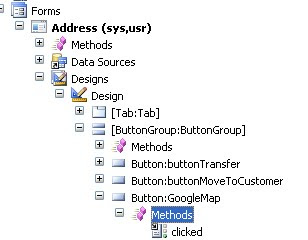
step 4 : Write the following code in the clicked method
void clicked()
{
super();
smmUtility::mapIt(address);
}
Step 5 : Goto the class --> "smmUtility" ----> mapIt (method)
The following Changes needs to be done in the following method.
In the mapIt method you will find the below code
#DEFINE.MapURL('http://maps.live.com/default.aspx?where1=\%1')
You need to replace the above code with
#DEFINE.MapURL('http://maps.google.com.au?q=\%1')
Now you open the address form , select anyone record which consists of address. Click the newly added button.
You can find that the new internet explorer will open with the google map page , which shows you the exact address of the AX record which you selected.
I am providing the steps for the integration of google map, this is an sample one, you can make use of the same as per your requirements.
Step 1 : open the Address Form in the editable mode , go to design part
Step 2 : Add button (Button name : Google map (as you wish)) in the button group.
step 3 : Add the clicked method in the newly added button

step 4 : Write the following code in the clicked method
void clicked()
{
super();
smmUtility::mapIt(address);
}
Step 5 : Goto the class --> "smmUtility" ----> mapIt (method)
The following Changes needs to be done in the following method.
In the mapIt method you will find the below code
#DEFINE.MapURL('http://maps.live.com/default.aspx?where1=\%1')
You need to replace the above code with
#DEFINE.MapURL('http://maps.google.com.au?q=\%1')
Now you open the address form , select anyone record which consists of address. Click the newly added button.
You can find that the new internet explorer will open with the google map page , which shows you the exact address of the AX record which you selected.
Subscribe to:
Posts (Atom)