
Integrating Google Map with AX 2009 :-
I am providing the steps for the integration of google map, this is an sample one, you can make use of the same as per your requirements.
Step 1 : open the Address Form in the editable mode , go to design part
Step 2 : Add button (Button name : Google map (as you wish)) in the button group.
step 3 : Add the clicked method in the newly added button
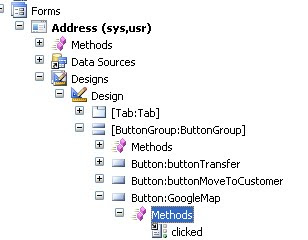
step 4 : Write the following code in the clicked method
void clicked()
{
super();
smmUtility::mapIt(address);
}
Step 5 : Goto the class --> "smmUtility" ----> mapIt (method)
The following Changes needs to be done in the following method.
In the mapIt method you will find the below code
#DEFINE.MapURL('http://maps.live.com/default.aspx?where1=\%1')
You need to replace the above code with
#DEFINE.MapURL('http://maps.google.com.au?q=\%1')
Now you open the address form , select anyone record which consists of address. Click the newly added button.
You can find that the new internet explorer will open with the google map page , which shows you the exact address of the AX record which you selected.
I am providing the steps for the integration of google map, this is an sample one, you can make use of the same as per your requirements.
Step 1 : open the Address Form in the editable mode , go to design part
Step 2 : Add button (Button name : Google map (as you wish)) in the button group.
step 3 : Add the clicked method in the newly added button

step 4 : Write the following code in the clicked method
void clicked()
{
super();
smmUtility::mapIt(address);
}
Step 5 : Goto the class --> "smmUtility" ----> mapIt (method)
The following Changes needs to be done in the following method.
In the mapIt method you will find the below code
#DEFINE.MapURL('http://maps.live.com/default.aspx?where1=\%1')
You need to replace the above code with
#DEFINE.MapURL('http://maps.google.com.au?q=\%1')
Now you open the address form , select anyone record which consists of address. Click the newly added button.
You can find that the new internet explorer will open with the google map page , which shows you the exact address of the AX record which you selected.

